
Technology

TWC TV on the Roku

Anyone that has been in my house knows that I love our Roku boxes. We have one on our 46-inch RCA LED TV in our living room and a box on each of our 32-inch RCA LED TV’s in our bedroom and loft. We primarily watch Netflix, Amazon Instant Video, Mormon Channel, BYUtv and Plex on our Roku box. On cable we watch the History Channel, HGTV, TV Land, PBS and a few other channels. We don’t rent a cable box so the channels we access to all fall under the “standard line” up. We also get our internet through Time Warner on the basic tier of internet service.

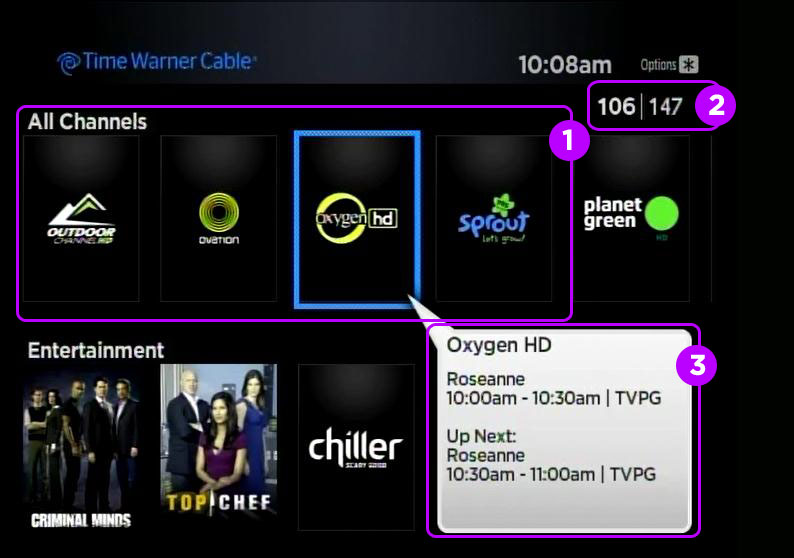
I missed the blog post announcement from last month that TWC had launched a channel on Roku but I noticed the announcement in an email I received yesterday. I had heard TWC was going to launch a Roku channel and I was excited to actually see it happen. So far I have been impressed but what is available on the box.

I downloaded the channel and then I entered my TWC ID information. And pretty soon most of my channels were showing up for me to select. I had a few additions and a few omissions to my channel line-up. The additions I had were a few channels that I had access to as a standard cable subscriber but were not showing up on my other TV due to my lack of a cable box. My omitted channels were my local TV line up. The only thing I miss there being PBS but I can always switch the TV source back to regular cable for that. I prefer watching the channels that show up through the Roku as most of those are the HD version of the channels and I get a limited channel guide to what’s currently playing and what’s up next. The only thing I feel I am missing is a more complete channel guide and PBS. I noticed a PBS show was in a screenshot of the TWC Roku channel so I will investigate if I can get that added somehow or if it was just photoshopped onto the screenshot.

If you have TWC Standard TV, TWC Internet and a Roku box… I would recommend this as something to look into using. It seems to be a good product to add a TV in a room without a cable connection or to add some cable box like features to a TV without a cablebox.

TWC TV on the Roku Read Post »
What would they sell at a Google Store?

chromebookRumors of a physical Google store have appeared on many blogs and news outlets recently. Some of the topics have included what approach Google would take to a store and what pitfalls to avoid. While listening to All About Android the hosts asked what would they sell? Sure Google has some products but they were at somewhat of a loss if you could really have a whole store for products. I felt it might be interesting to look at potential products that would grace the shelves of a Google store.

Nexus 4

The Nexus 4 is Google’s fourth Nexus branded smart phone. The Nexus 4 is manufactured by LG Electronics and starts at $299. There are two models in the Google Play Store of the Nexus 4.

Nexus 7

The Nexus 7 is Google’s 7-inch tablet that set the standard for Android Tablets. The Nexus 7 is manufactured by Asus and starts at $199. There are four models in the Google Play Store of the Nexus 7.

Nexus 10

The Nexus 10 is Google’s 10.1 inch tablet that followed the Nexus 7. The Nexus 10 is manufactured by Samsung and starts at $399. There are two models in the Google Play Store of the Nexus 10.

Google TV

Google TV is a Smart TV platform that can be integrated in a home theater as set top box or in the TV itself. Google does not currently sell Google TV devices in the Play Store but a physical store would be an ideal location to display Google TV devices.

Nexus Q

The Nexus Q was a media streaming set top box introduced and canned by Google in 2012. If Google brought back the device at a lower price point, it might also do well in a store location.

Google Chromebook

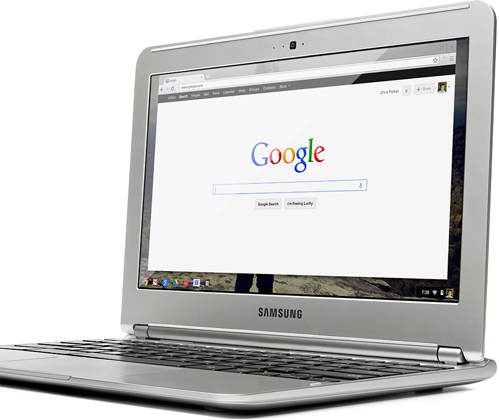
Google currently carries three models of the Google Chromebook on Google Play. The Acer C7 comes in at $199, the Samsung Chromebook at $249 and the new Chromebook Pixel is 1,299. A physical store might be an ideal location to display the differences between the three models.

Google Glass

Glass is Google’s augmented reality eyewear that will be released in 2013.  They will be sold for less than $1,500 and sound like something out of a science fiction novel. Google Glass could justify a physical store on it’s own just so users could see the technology displayed.

Accessories

Google has several accessories for each of these products and if they had a store, I would expect more.

Looking over the various Google Products I could easily see them filling a small store with display models of all their products and some inventory on hand for sale. I could see a physical Google store as a great place to show case some of their newest products and really give a consumer an idea why they need to buy the product.

What would they sell at a Google Store? Read Post »

How to run a campaign from an electronic media perspective

I have decided to do a write up on running a political campaign from an electronic media perspective. Many local politicians have a fire and drive for running for office but they neglect a few easy steps for creating an online presence for undecided voters. I have been hired by local politicians in the past to help improve their presence on the Internet and I would like to share that experience with others. The things I will recommend are pretty easy for someone that is technically competent and should not take a large amount of valuable time. If you lack technical expertise and/or time I recommend that you find someone you can trust willing to help with your campaign in this area. As potential voters look more and more to the Internet for information, you need a presence for them to find. The first article will be on branding.

How to run a campaign from an electronic media perspective Read Post »

CyanogenMod 10 On My Nook Color

 I felt it was time for an update on what I have been doing with my Nook Color. My last post was when I had CyanogenMod 7 on it. Since that time my Nook went around the world and visited Kuwait, Afghanistan and Kyrgyzstan.  In those locations it braved sand, heat, snow and cold. I’ve read over 20 books on the device and watched my son grow from an infant to a toddler. Using Google Voice I was also able to text and keep in touch with my wife as I was far from her. The SD card also helped to hold hours of music and videos for when I was traveling or just left with some down time.

Some where along that journey I found the time to install CM9 and later CM10 on the device. I went from running unofficial betas built by the community as a labor of love to receiving full CyanogenMod official status again. I have to say the developers in this community have done an awesome job keeping this ereader gone tablet going. It’s quite amazing to see what this hardware can do despite the original limitations of design.

As far as general usability I still have to give CM7 some what of an edge. CM10 lags a little and has a slightly lower battery performance. Despite the minor performance drops, I would still recommend CM10 to someone that has already placed a rom on their Nook. It’s fun to have the latest and greatest Android can offer. I can see myself still using this tablet into the future. It fits my needs well.

CyanogenMod 10 On My Nook Color Read Post »